Using nftables to allow ingress traffic from internet to intranet resources

I recently heard about a case where someone wanted to allow an AWS EC2 instance on a public IP address to access a corporate intranet resource. Their solution was to run an HAProxy server on the corporate network that could proxy traffic from the AWS compute instance to the intranet server.

Whether or not accessing intranet resources from an external host is good idea or violates corporate policy I will leave aside for now, but I thought of 6 additional ways to accomplish the same objective.

What follow is one of those 6 ideas: using Network Address Translation (NAT) on the intermediary host via nftables. I have spent far more time with iptables than I have with nftables. But this seemed like a good opportunity to experiment.

The 3 servers for this example:

  1. The corporate intranet resource, intranet.osric.net or 192.0.2.43
  2. The NAT host, nat.osric.net or 198.51.100.200
  3. The AWS EC2 instance, ec2-203-0-113-155.compute-1.amazonaws.com or 203.0.113.155

The nat.osric.net server is running RHEL 10, although the commands should work on other systems using nftables.

I followed the steps provided by Configuring destination NAT using nftables on nat.osric.net:

sudo nft add table nat
sudo nft -- add chain nat prerouting { type nat hook prerouting priority -100 \; }
sudo nft add chain nat postrouting { type nat hook postrouting priority 100 \; }

The next commands needed the interface name, which I found using nmcli device status (ens5 in this case).

sudo nft add rule nat prerouting iifname ens5 tcp dport { 80, 443 } dnat to 192.0.2.43
sudo nft add rule nat postrouting oifname "ens5" snat to 198.51.100.200
echo "net.ipv4.ip_forward=1" | sudo tee /etc/sysctl.d/95-IPv4-forwarding.conf
sudo sysctl -p /etc/sysctl.d/95-IPv4-forwarding.conf

It worked! Well, with a couple caveats: an issue with the TLS certificate, and a wide-open NAT configuration.

The TLS certificate

From the EC2 instance:

$ curl https://198.51.100.200
curl: (60) SSL: no alternative certificate subject name matches target host name '198.51.100.200'
More details here: https://curl.se/docs/sslcerts.html

curl failed to verify the legitimacy of the server and therefore could not
establish a secure connection to it. To learn more about this situation and
how to fix it, please visit the web page mentioned above.

I could think of a few ways around this:

  • Add an entry to /etc/hosts on the client, i.e. on ec2-203-0-113-155.compute-1.amazonaws.com
  • Ignore the warning, e.g. curl --insecure https://198.51.100.200/
  • Add a subject alternative name (e.g. nat.osric.net) to the TLS cert for intranet.osric.net

The last method, adding a Subject Alternative Name (SAN) sounded like a pain, and also may not be feasible if you don’t manage the TLS certificate for that host. And I never like ignoring security warnings. But editing the /etc/hosts file was a simple solution that worked. Here’s the line I added to the EC2 instance (ec2-203-0-113-155.compute-1.amazonaws.com):

198.51.100.200   intranet.osric.net

After that, I was able to use curl https://intranet.osric.net/ to return content without errors or warnings.

The wide-open NAT

The configuration, as implemented, could allow anyone on the Internet to bypass the network security controls around intranet.osric.net. All they have to do is visit nat.osric.net (and maybe ignore some TLS warnings). This is terrible! Fortunately, we can use nftables to limit NAT to only specific inbound traffic.

How can I review what has already been added to nftables? Fortunately, Quick reference-nftables in 10 minutes was helpful here.

$ sudo nft list tables
table ip nat
$ sudo nft list chains
table ip nat {
        chain prerouting {
                type nat hook prerouting priority dstnat; policy accept;
        }
        chain postrouting {
                type nat hook postrouting priority srcnat; policy accept;
        }
}
$ sudo nft list ruleset
table ip nat {
        chain prerouting {
                type nat hook prerouting priority dstnat; policy accept;
                iifname "ens5" tcp dport { 80, 443 } dnat to 192.0.2.43
        }

        chain postrouting {
                type nat hook postrouting priority srcnat; policy accept;
                oifname "ens5" snat to 198.51.100.200
        }
}

In order to delete the dnat rule, I needed its handle. To get this, I used the -a flag:

$ sudo nft -a list ruleset
table ip nat { # handle 1
        chain prerouting { # handle 1
                type nat hook prerouting priority dstnat; policy accept;
                iifname "ens5" tcp dport { 80, 443 } dnat to 192.0.2.43 # handle 8
        }

        chain postrouting { # handle 2
                type nat hook postrouting priority srcnat; policy accept;
                oifname "ens5" snat to 198.51.100.200 # handle 9
        }
}

I deleted handle 8:

sudo nft delete rule nat prerouting "handle 8"

And added a new prerouting rule:

sudo nft add rule nat prerouting iifname ens5 ip saddr 203.0.113.155 tcp dport { 80, 443 } dnat to 192.0.2.43

That provides NAT for only the EC2 instance at 203.0.113.155.

The thing that I like about this solution is that it requires no new software. It uses the networking functionality that is already present on the host. However, unless you take additional steps, there is virtually no logging. nftables can log messages to syslog for packets that match the DNAT rule, but even that is very different than the level of logging that a proxy server would provide.

References:

During some initial testing, I was using another EC2 instance as the NAT server and it did not work immediately. That’s because the EC2 instance was not aware of its own public IPv4 address, it was only aware of its private IPv4 address: 172.31.15.224. Removing the SNAT rule for the public IP address and adding a new SNAT rule for 172.31.15.224 solved that.

Bash alias Magic Eight Ball

I’m perhaps overly-fond of the Magic Eight Ball (or Magic 8-Ball, if you prefer).

It is perhaps surprising, then, that I have never created this Bash alias before:

alias 8ball='shuf -n1 -e "As I See It Yes" "Ask Again Later" "Better Not Tell You Now" "Cannot Predict Now" "Concentrate And Ask Again" "Don'"'"'t Count On It" "It Is Certain" "It Is Decidedly So" "Most Likely" "My Reply Is No" "My Sources Say No" "Outlook Good" "Outlook Not So Good" "Reply Hazy Try Again" "Signs Point To Yes" "Very Doubtful" "Without A Doubt" "Yes" "Yes Definitely" "You May Rely On It"'

"Don'"'"'t Count On It" was the trickiest part, fortunately StackOverflow helped me with How to escape single quotes within single quoted strings?

Harmless fun:

$ 8ball
Ask Again Later
$ 8ball
My Reply Is No
$ 8ball
Very Doubtful

Almost as good as running yes yes or yes no!

JACODA – JAvascript COmpact DAta notation

On a lark, I made up a new JavaScript notation for representing tabular data: JACODA, or JAvascript COmpact DAta notation.

The idea is that many JSON datasets are really just CSV files, except that the header row/field labels are included with every single record. That just feels inefficient, doesn’t it? Why not just include a header row, like a spreadsheet or CSV file?
Continue reading JACODA – JAvascript COmpact DAta notation

Default version of Python on Rocky Linux 8

Some questions came up at work today about the default version of Python on Rocky Linux 8. Someone said it was Python 3.6.8, others said it was Python 3.9.

I decided to test this empirically and install Rocky Linux 8.10 from the minimal ISO. The answer is:

You’re all wrong. There is no default version of Python on Rocky Linux 8. (At least, not on the minimal ISO, i.e. Rocky-8.10-x86_64-minimal.iso.)

There is, however, platform-python. Rocky Linux needs Python as a dependency for various other tools. That version is, in fact, Python 3.6.8:

[root@localhost ~]# dnf info platform-python
Last metadata expiration check: 0:24:11 ago on Tue 11 Jun 2024 05:49:30 PM EDT.
Installed Packages
Name         : platform-python
Version      : 3.6.8
Release      : 62.el8_10.rocky.0
Architecture : x86_64
Size         : 40 k
Source       : python3-3.6.8-62.el8_10.rocky.0.src.rpm
Repository   : @System
From repo    : anaconda
Summary      : Internal interpreter of the Python programming language
URL          : https://www.python.org/
License      : Python
Description  : This is the internal interpreter of the Python language for the system.
             : To use Python yourself, please install one of the available Python 3 packages,
             : for example python36.

As the description mentions, if you, as a user of the Linux system, want to run Python, you’ll need to install it. Rocky Linux provides several packages:

[root@localhost ~]# dnf install python
Last metadata expiration check: 0:30:25 ago on Tue 11 Jun 2024 05:49:30 PM EDT.
No match for argument: python
There are following alternatives for "python": python2, python3.11, python3.12, python36, python38, python39
Error: Unable to find a match: python

I decided to install all of the versions offered. After installing, I checked the version of each:

[root@localhost ~]# python --version
-bash: python: command not found
[root@localhost ~]# python2 --version
Python 2.7.18
[root@localhost ~]# python3 --version
Python 3.6.8
[root@localhost ~]# python3.8 --version
Python 3.8.17
[root@localhost ~]# python3.9 --version
Python 3.9.19
[root@localhost ~]# python3.11 --version
Python 3.11.7
[root@localhost ~]# python3.12 --version
Python 3.12.1

There is no default python, although you can easily create that alias/link:

[root@localhost ~]# ln /usr/bin/python3.12 /usr/bin/python
[root@localhost ~]# python --version
Python 3.12.1

However, it appears that Rocky 8 will make Python 3.6.8 the target of the python3 alias/link if it is installed. I am basing this claim on the following:

  1. I uninstalled all python3* versions: dnf remove python36 python38 python39 python311 python312
  2. I installed python312. python --version showed Python 3.12.1
  3. I installed python36. python --version showed Python 3.6.8
  4. I installed python39. python --version still showed Python 3.6.8

That suggests it’s not just the most-recently installed Python 3 version that becomes the target of the python3 link. Python 3.6.8, if installed, seems to take precedence over other versions (or at least other versions won’t overwrite the link).

Extracting links from Google Sheets

I was working with a shared Google Sheet at work and ran into this:

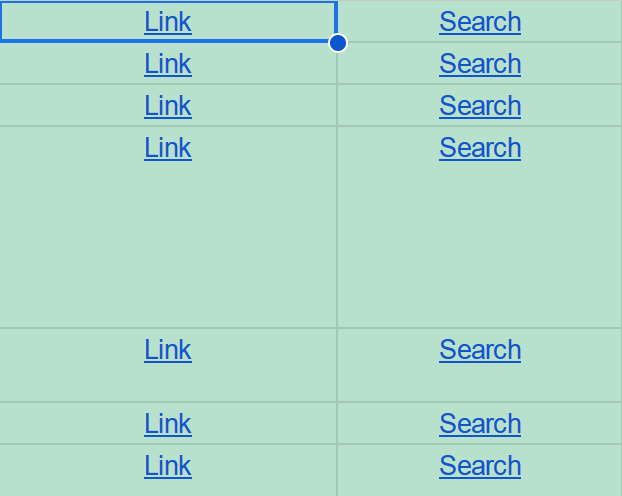
An excerpt of a Google Sheet. Each row contains a cell with a hyperlink labeled Link
An excerpt of a Google Sheet. Each row contains a cell with a hyperlink labeled Link, but the actual URL is not displayed.

I get it, URLs can be long and messy. We want narrow columns that look clean, not cluttered. But I wanted to analyze the URLs and search for certain content and patterns, which were hidden from me behind the link text.

How can I extract all the URLs?
Continue reading Extracting links from Google Sheets

Hosting a static site on AWS using S3 and CloudFront

A few years ago, Michael Berkowski gently scolded me for hosting a site on HTTP — not HTTPS. I decided that the easiest way to fix this (ignoring Let’s Encrypt for now) was to instead host the site, a static site that hasn’t been updated in years, on AWS. Specifically, to host the site using S3 and CloudFront.

The domain was redbuswashere.com, related to a road trip adventure that didn’t go exactly as planned.

Since that time, I’ve migrated several other sites to AWS, using S3 to store the files and CloudFront as the front-end CDN. I’ve learned a few things in the process, including several of the things that can go wrong. I’ve also created a YouTube video on the process, for people who want to see this step-by-step: Hosting a Static HTML Site on AWS S3.

Continue reading Hosting a static site on AWS using S3 and CloudFront

DirectoryIndex on a static HTML site hosted by AWS

Apache’s mod_dir has a DirectoryIndex option so that if you request a directory, it can return the index document for that directory. For example:

https://www.example.com/dir/ would return https://www.example.com/dir/index.html

The directive typically looks something like this:

DirectoryIndex index.html index.cgi index.pl index.php index.xhtml index.htm

(It’s been many years since I’ve seen index.cgi and index.pl!)

When I recently converted a WordPress site to a static site and hosted it via AWS CloudFront backed by AWS S3 buckets, I found that directory indexes didn’t work. A request for https://www.example.com/dir/ would return a 403 Forbidden error.

StackOverflow to the rescue (and a question from 2015, no less): How do you set a default root object for subdirectories for a statically hosted website on Cloudfront? included several possible solutions.

The solution I liked best was to deploy a pre-built Lambda function that implements similar functionality: standard-redirects-for-cloudfront.

Note that the instructions guide you to get the ARN from the CloudFormation output panel. This is important, as it is not just the ARN but also an appended version number. (In my case it was the ARN followed by :1.) Otherwise you’ll get the following error when adding it to the Origin request section of the CloudFormation behavior:

The function ARN must reference a specific function version. (The ARN must end with the version number.)

Minor improvements to legacy Perl code

We’re always working with code we didn’t write. You’ll spend far more time looking at code you didn’t write (or don’t remember writing) than you will spend writing new code.

Today I looked at an example Perl script that used 45 lines of code to pull the company associated with an OUI (Organizationally Unique Identifier) from a text file, given a MAC address.

I thought I could do slightly better.

find_mac_co.sh:

#!/bin/sh
OUI=$(echo "$1" | sed 's/[^A-Fa-f0-9]//g' | cut -c1-6)
awk -F "\t" -v IGNORECASE=1 -v OUI="$OUI" '$0 ~ OUI { print $3 }' ouidb.tsv
exit 0

Example run:

$ sh find_mac_co.sh 7c:ab:60:ff:ff:ff
Apple, Inc.

There’s probably a way to make the Perl version shorter too. I’m more familiar with bash and shell commands.

The biggest problem with this script is that it relies on an up-to-date list of OUIs. An even better way is to query an API:

find_mac_co_api.sh

#!/bin/sh
MACADDRESS="$1"
curl "https://api.maclookup.app/v2/macs/$MACADDRESS/company/name"
exit 0

Example run:

$ sh find_mac_co_api.sh 7c:ab:60:ff:ff:ff
Apple, Inc.

Renaming multiple files: replacing or truncating varied file extensions

In the previous post, I ran into an issue where Wget saved files to disk verbatim, including query strings/parameters. The files on disk ended up looking like this:

  • wp-includes/js/comment-reply.min.js?ver=6.4.2
  • wp-includes/js/jquery/jquery-migrate.min.js?ver=3.4.1
  • wp-includes/js/jquery/jquery.min.js?ver=3.7.1
  • wp-includes/css/dist/block-library/style.min.css?ver=6.4.2

I wanted to find a way to rename all these files, and truncate the filename after and including the question mark. As an example, to convert jquery.min.js?ver=3.7.1 to jquery.min.js.

Continue reading Renaming multiple files: replacing or truncating varied file extensions